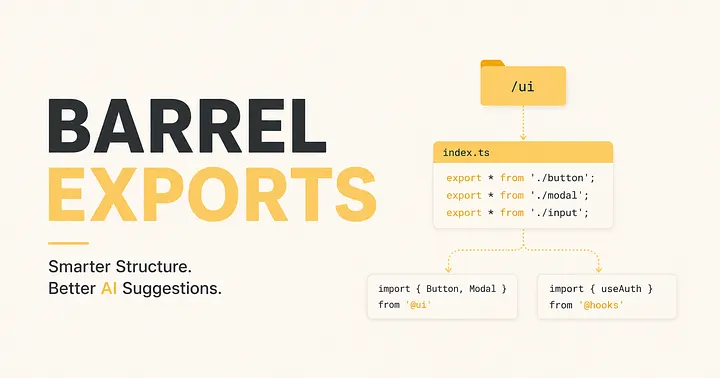
 Barrel Exports
Barrel Exports: The Simplest Thing You’re Not Doing And A JavaScript Pattern That Makes AI Agents Smarter.
A practical guide to exports, barrel files, and the conventions that separate codebases that scale from ones that don’t.
Sounds familiar?
You’re three weeks into a project. The codebase has grown. And now every file you open starts with this:
import { Button }   from '../../components/ui/Button/Button';
import { Modal }    from '../../components/ui/Modal/Modal';
import { Tooltip }  from '../../components/ui/Tooltip/Tooltip';
import { useAuth }  from '../../hooks/auth/useAuth';
import { formatDate } from '../../utils/date/formatDate';
Long paths. Repeated folder names. One refactor away from breaking everything. And it only gets worse as the project grows.
The fix is surprisingly simple — but to get there properly, we need to understand exports first. Because that’s where it all begins.
Understanding exports
JavaScript has exactly 3 types of exports
Before barrels make sense, you need to know what you’re exporting in the first place.
1. Named exports
You give something a name when you export it. The consumer uses that exact same name when importing.
export const add = (a, b) => a + b;
export function multiply(a, b) { return a * b; }
export class Calculator { ... }
// importing — name must match exactly
import { add, multiply } from './math';// or alias it — rename on the consumer side
import { add as sum } from './math';
One file can have as many named exports as it wants. This is the type you’ll use the most.
2. Default export
Every file can have one and only one default export. The consumer names it whatever they want — there’s no enforcement.
export default function calculate(a, b) { return a + b; }
// all of these are valid — same import, different names
import calculate  from './math';
import doTheMath  from './math';
import whatever   from './math'; // still works
Because there’s no enforced name, the same function can get called three different things across your codebase — and no one will catch it until it’s already confusing.
3. Re-exports
Not a new export type — just a way to pass exports through from another file without pulling them into your own scope. This is the foundation of barrel files.
// re-export a named export
export { Button } from './Button/Button';
// re-export and rename it
export { add as sum } from './math';// re-export a default export as a named one
export { default as Icon } from './Icon/Icon';// re-export everything — use with caution
export * from './math';
Export best practices
Named exports, almost always
This single rule will make your codebase more consistent than any linter config. Consistent naming everywhere. Editor autocomplete works perfectly. Refactoring is safe. Works naturally with barrels.
Avoid default exports
No name enforcement. Consumer calls it anything. Barrel re-exports get awkward. Harder to search and refactor.
The one exception: framework pages. Next.js, React Router, and similar tools require a default export at the page/route level. That’s a framework constraint — not a best practice to follow everywhere else.
// Next.js page — framework requires this
export default function HomePage() { ... }
// everything else — use named
export function Button() { ... }
export function useDebounce() { ... }
export const API_URL = 'https://api.example.com';
Don’t mix default and named in one file
It creates ambiguity about what the “main thing” in the file is, and makes barrel re-exporting messy.
// ❌ confusing — what's the primary thing here?
export default function Button() { ... }
export const ButtonSizes = { SM: 'sm', MD: 'md' };
// ✅ clean — everything named, everything intentional
export function Button() { ... }
export const ButtonSizes = { SM: 'sm', MD: 'md' };
Export at declaration, not at the bottom
// ✅ export inline — visible immediately, nothing to forget
export function add(a, b) { return a + b; }
export const PI = 3.14159;
// ⚠️ easy to forget to update this list when you add something new
function add(a, b) { return a + b; }
const PI = 3.14159;
export { add, PI };
TypeScript: use export type for types
If you’re in TypeScript, always use export type
for interfaces and types. It signals to the compiler and bundler that
this disappears at runtime — no JavaScript gets emitted for it.
// ✅ explicit — bundler knows it's type-only
export type { ButtonProps } from './Button';
export type ButtonVariant = 'primary' | 'secondary';
// ⚠️ works but loses the type-only signal
export { ButtonProps } from './Button';
Now you’re ready for barrels —
A barrel is just an index.js (or index.ts) file that sits inside a folder and re-exports everything from that folder. It's the front door to your module.
Here’s why bundlers pick it up automatically: when you import a folder path like '../../components/ui', the module resolver looks for an index.js inside that folder. No config needed — it's built into how Node and every major bundler works.
// components/ui/index.ts — the barrel
export { Button }     from './Button/Button';
export { Modal }      from './Modal/Modal';
export { Tooltip }    from './Tooltip/Tooltip';
export { default as Icon } from './Icon/Icon'; // default → named
Now every import in your entire app becomes:
import { Button, Modal, Tooltip, Icon } from '../../components/ui';
One line. One path. And if you ever rename or move
Button.tsx, you update only the barrel — every consumer stays untouched.
Barrels define your public API
What you put in the barrel is public. What you leave out is effectively private. No extra tooling required.
components/
  ui/
    Button/
      Button.tsx         ← in the barrel — public
      Button.utils.ts    ← NOT in barrel — internal only
      Button.test.ts     ← NOT in barrel — internal only
    index.ts             ← the barrel — your public API
Anyone using your module only ever sees what you choose to expose. That’s real encapsulation — without classes, without frameworks, just a file.
Doing it right
How to structure barrels properly
One barrel per folder boundary
Not one mega barrel for everything. One per logical group — components, hooks, utils.
src/
  components/
    ui/index.ts        ← UI primitives
    layout/index.ts    ← layout components
  hooks/index.ts        ← custom hooks
  utils/index.ts        ← utility functions
  index.ts             ← optional top-level re-export
This also works great with feature-based folder structures:
src/
  features/
    auth/index.ts       ← exports everything auth-related
    dashboard/index.ts  ← exports everything dashboard-related
    profile/index.ts    ← exports everything profile-related
Pair with path aliases
This is where the Barrels actually shine ✨
They get even better when you add path aliases in your tsconfig.json or vite.config.js. No more ../../..
// tsconfig.json
{
  "compilerOptions": {
    "paths": {
      "@ui":    ["src/components/ui/index.ts"],
      "@hooks": ["src/hooks/index.ts"],
      "@utils": ["src/utils/index.ts"]
    }
  }
}
// now imports look like this — from anywhere in the app
import { Button, Modal }  from '@ui';
import { useDebounce }    from '@hooks';
import { formatDate }     from '@utils';
This is the final form. Clean paths, clear module boundaries, no relative path guessing.
The traps
What to watch out for
Never use wildcard re-exports in barrels
Wildcard exports — export * — feel convenient but cause silent name collisions and make tree-shaking unreliable.
// ❌ if both files export something named "id", one silently wins
export * from './User';
export * from './Product';
// ✅ explicit — no surprises, no collisions
export { User }    from './User';
export { Product } from './Product';
Watch out for circular dependencies
If
Barrel A re-exports from Barrel B, and Barrel B re-exports from Barrel A
— you have a circular dependency. The app may silently get undefined at runtime with no clear error.
// ❌ circular — runtime undefined, no error thrown
// features/auth/index.ts
export { UserProfile } from '../profile'; ← imports from profile barrel
// features/profile/index.ts
export { AuthToken }   from '../auth';    ← imports from auth barrel
Circular barrel deps are silent killers. Use a tool like Madge to detect them:
npx madge --circular src/
Set sideEffects: false for tree-shaking
Without this, some bundlers pull in the entire barrel even when you only import one thing from it. Add this to your package.json:
// package.json
{
  "name": "your-app",
  "sideEffects": false
}
This tells the bundler: “nothing in this package runs code just by being imported — it’s safe to drop anything unused.” Modern bundlers like Vite and Webpack 5 handle this well once it’s set.
Don’t go deeper than 2 levels of barrel nesting!
A barrel that re-exports from another barrel that re-exports from another barrel creates a chain the bundler has to walk at startup. In large Next.js apps this is a known cause of slow dev server cold starts.
// ❌ deep chain — slow cold start in large apps
src/index.ts → components/index.ts → ui/index.ts → primitives/index.ts
// ✅ max 2 levels deep
src/index.ts → features/auth/index.ts
Final take
So should you use barrels?
Yes — use them
Component libraries, shared hooks, feature folders, anything with a clear public API.
Skip it
Tiny scripts or single-file utilities. A barrel for one export is just noise.
“Barrels aren’t a feature of JavaScript. They’re a discipline. And like most good disciplines, they cost almost nothing to start and pay off for as long as the project lives.”
The rules in one place
Do’s
- named exports always
- export at declaration
- one barrel per boundary
- pair with path aliases
- export type in TS
Don’ts
- no wildcard re-exports
- no circular deps
- no god barrels
- max 2 levels deep
Barrel exports make you better at vibe coding too
Everyone is using AI coding agents right now. Claude Code, Cursor, Copilot — they’re all crawling through your codebase to understand it before writing a single line. And here’s the thing nobody tells you: the way your codebase is structured directly affects how many tokens the agent burns, how accurate its suggestions are, and how fast it responds.
The agent reads files to understand your code
When you ask an agent to “add a modal to this page”, it doesn’t magically know what’s available in your project. It explores. It reads files. It tries to figure out what components exist, where they live, and what they’re called.
Without barrels, that exploration looks like this — the agent reads your folder tree, picks a component folder, opens Button/Button.tsx, then Modal/Modal.tsx, then Tooltip/Tooltip.tsx, one file at a time, burning tokens on every read just to build a picture of what's available.
With a barrel, it reads one file — components/ui/index.ts
— and instantly knows everything that module exposes. Ten exports
visible in ten lines. Same information, a fraction of the token cost.
The barrel is your codebase’s table of contents. Agents love tables of contents.
Shorter import paths mean less noise in context
Every file the agent reads or writes goes into its context window. And context is full of import statements. Compare what an agent has to process in both cases:
without barrels —
import { Button }    from '../../components/ui/Button/Button';
import { Modal }     from '../../components/ui/Modal/Modal';
import { Tooltip }   from '../../components/ui/Tooltip/Tooltip';
import { useAuth }   from '../../hooks/auth/useAuth';
import { formatDate } from '../../utils/date/formatDate';
with barrels + aliases — clean context
import { Button, Modal, Tooltip } from '@ui';
import { useAuth }                from '@hooks';
import { formatDate }             from '@utils';
That’s a lot of reduction in import noise — on every single file the agent touches. Multiply that across a conversation with 20 file reads and you’re saving a meaningful chunk of context before the agent has written anything useful.
The barrel signals what’s public — the agent won’t guess wrong
Without a barrel, an agent exploring your codebase has no way to know whether Button.utils.ts
is a public utility or an internal helper. It might use it. It might
import it directly. You'll get a suggestion that technically works but
breaks your module boundaries.
With a barrel, the signal is unambiguous. What’s in index.ts
is public. Everything else is internal. The agent reads that barrel
first and immediately knows the boundaries — it will suggest imports
from @ui, not from ../../components/ui/Button/Button.utils.
Well-structured barrels act like implicit documentation for AI agents. You don’t have to explain your module boundaries in a prompt — the code already does it.
Named exports eliminate agent confusion
Remember the default export problem — where the same component gets called Button, Btn, and MyButton
in different files? Agents pick up on that inconsistency. They have to
reason about whether these are the same thing or different things. That
reasoning costs tokens and sometimes produces wrong answers.
Named exports mean one name, everywhere, always. The agent sees Button in the barrel, sees Button in every file that uses it, and never has to reconcile anything. Less ambiguity, more accurate suggestions, faster responses.\
What this looks like in practice
Without barrels -
Agent asks to explore folder structure. Reads 8 files to understand what components exist. Burns context on long import paths. Occasionally imports internal helpers it shouldn’t. Suggests inconsistent names.
With barrels + aliases —
Agent reads one barrel per module. Knows the public API immediately. Writes clean imports from the start. Respects module boundaries naturally. Consistent names in every suggestion.
This isn’t just about being tidy. In long agentic sessions — where the agent is making 20, 30, 50 tool calls — the token savings from clean structure compound. A well-organised codebase genuinely costs less to work with.
One more thing — CLAUDE.md and barrel docs
If you’re using Claude Code specifically, you can add a CLAUDE.md
file at the root of your project. This file gets read at the start of
every session and gives the agent context about your project. Barrel
exports make this file dramatically more useful:
## Module structure
All shared code is exported through barrel files with path aliases.
Do not import from deep paths — always use the aliases below.## Path aliases@ui      → src/components/ui/index.ts    (Button, Modal, Tooltip, Icon)
@hooks   → src/hooks/index.ts           (useAuth, useDebounce, useFetch)
@utils   → src/utils/index.ts           (formatDate, cn, slugify)
@features → src/features/index.ts        (Auth, Dashboard, Profile)## Rules- Always use named exports
- Never import from internal files (*.utils.ts, *.helpers.ts)
- Check the barrel before creating a new component
Now the agent starts every session already knowing your module map. It doesn’t need to explore. It doesn’t need to guess. It just uses what you’ve documented — and your barrels make that documentation accurate by design.
Some more in-depth blogs on this from industry professionals —